Target Templates
Target Templates allow you to overwrite the general behavior from Scheduler Configuration for specific targets.
They are useful when a certain kind of target should usually behave differently from your normal default scheduling rules.
When Target Templates Help
They are useful when you have targets that should usually use different scheduling behavior, for example:
- a different minimum altitude
- a different filter shooting pattern
- a different moon-related behavior
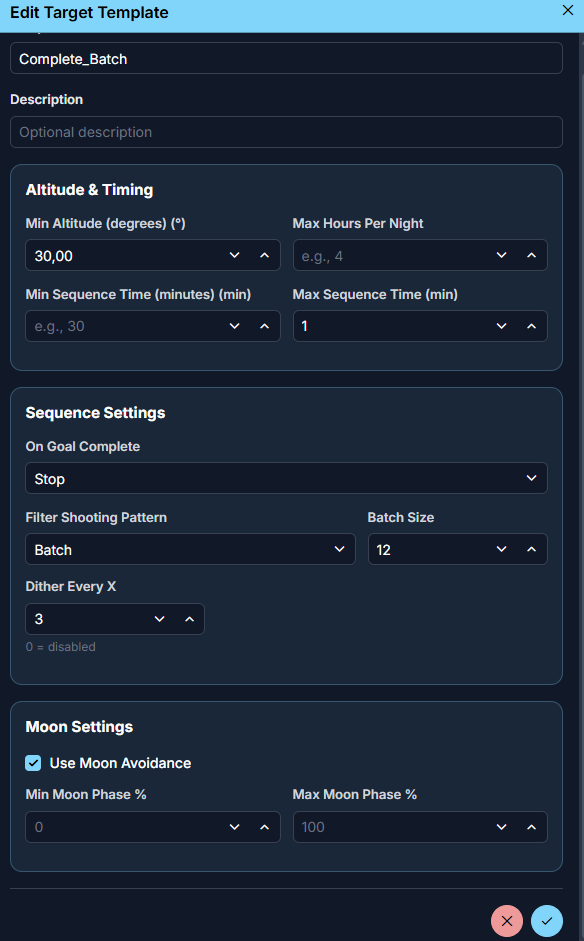
Altitude And Timing
These settings control when and how long the target should be considered useful.
Min Altitude
Overrides the normal minimum altitude for targets using this template.
Max Hours Per Night
Limits how long AstroManager should spend on that target during one night.
Min Sequence Time
Defines the minimum duration AstroManager should consider for a useful sequence block.
Max Sequence Time
Defines the maximum length AstroManager should allow in one sequence block for the target.
Sequence Settings
These settings define how AstroManager should treat the target while it is being scheduled.
On Goal Complete
Defines what should happen once a goal is completed.
AstroManager supports these options:
StopStop scheduling the target once its imaging goals are complete.Lower PriorityLower the target to a reduced priority value and keep it available.ContinueKeep scheduling the target at the same priority even after the goals are complete.
If Lower Priority is used, the Lower Priority To field becomes relevant.
Lower Priority To
Defines the new lower priority value after goal completion, if that behavior is selected.
Filter Shooting Pattern
Defines how filters should be scheduled for this target.
AstroManager supports these patterns:
ParallelRotate through filters continuously, for exampleR -> G -> B -> R -> G -> B.BatchShoot a batch of exposures per filter before switching, for exampleRRR -> GGG -> BBB.SequentialComplete one filter before moving to the next, for exampleRRRR... -> GGGG... -> BBBB....
Batch Size
Used only when the shooting pattern is Batch.
Defines how many exposures AstroManager should take before switching to the next filter.
Dither Every X
Defines after how many exposures AstroManager / N.I.N.A. should dither.
0 disables dithering from this template.
Moon Settings
These settings define how the moon should affect targets using this template.
Use Moon Avoidance
Turns moon avoidance on or off for targets using this template.
See Moon Avoidance.
Min Moon Phase
Defines the minimum moon phase percentage allowed for targets using this template.
Max Moon Phase
Defines the maximum moon phase percentage allowed for targets using this template.
This can be useful if a certain target type should only be considered in darker lunar conditions.