Scheduler Configuration
Scheduler Configuration defines the general scheduling behavior AstroManager should use when more than one target is possible.
What This Influences
Scheduler configuration affects things like:
- which target AstroManager prefers first
- how AstroManager ranks viable targets
- how filters should be scheduled within a target
- how long a target may run in one night
- how AstroManager behaves when no target is available
- how AstroManager reacts to runtime errors
When To Care About It
You do not need to master scheduler configuration before your first test night.
It becomes more important when:
- you run larger target queues
- you want more predictable automation
- you want finer control over scheduling decisions
How It Fits Into The System
First, you define one or many scheduler configurations. One of them is set as the global default.
Then, in the Remote Control Dashboard, you can assign a different default scheduler configuration per client.
Finally, in the N.I.N.A. Scheduler, you can choose whether AstroManager should use the default scheduler configuration for that client or a specific scheduler configuration.
Some of these settings can also be overridden later:
- per target by Target Templates
- per imaging goal by Exposure Templates
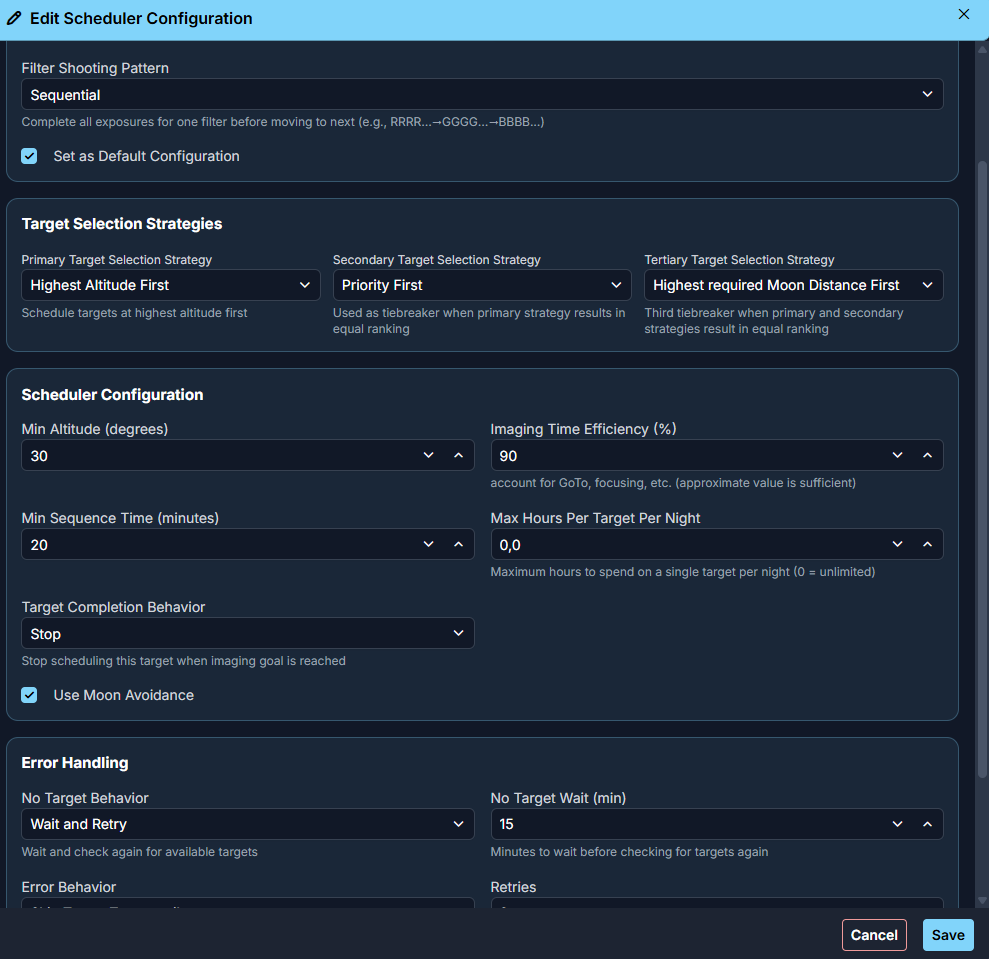
Target Selection Strategies
The scheduler supports a primary, secondary, and tertiary target-selection strategy.
These strategies define how AstroManager ranks viable targets when more than one target is currently possible.
Currently supported strategies are:
Priority FirstAstroManager prefers the target with the lowest priority value first. (Priority 5 is preferred over 42)Altitude FirstAstroManager prefers the target that is currently higher in the sky.Time FirstAstroManager prefers the target with the shortest observability window first.Highest Time FirstAstroManager prefers the target with the largest observability window first.Higher Completion FirstAstroManager prefers the target that is already further along in its completion progress.Moon Avoidance FirstAstroManager prefers the target whose filters require the largest moon-avoidance distance first.
You can combine these strategies by setting a primary, secondary, and tertiary rule.
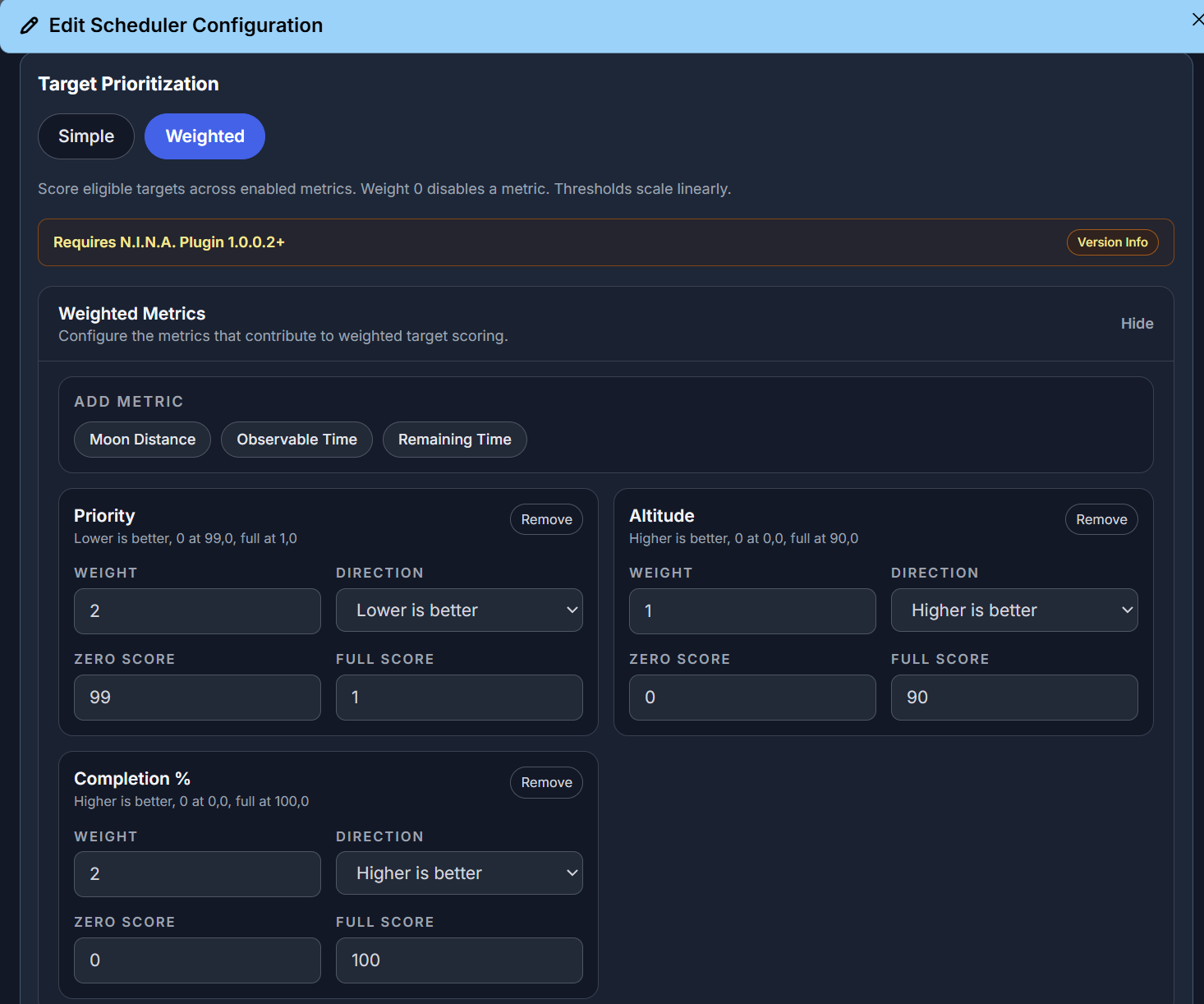
Weighted Mode
AstroManager also supports a dedicated Weighted Mode for more advanced target ranking.
In this mode, the scheduler does not just compare one strategy after another. Instead, it combines multiple weighted factors into one ranking result.
This is especially useful when you want more nuanced scheduling behavior, for example:
- preferring targets that are already well progressed
- still rewarding good current altitude or time-window fit
- defining thresholds so weak candidates drop out before weighting matters
Weighted Mode also includes a preview so you can inspect how AstroManager currently ranks targets before you use the configuration in a real session.
Filter Shooting Pattern
Filter Shooting Pattern controls how AstroManager should schedule imaging goals within one target.
AstroManager currently supports these patterns:
ParallelRotate through imaging goals continuously, for exampleR -> G -> B -> R -> G -> B.BatchShoot a batch of exposures per imaging goal before switching, for exampleRRR -> GGG -> BBB.SequentialComplete one imaging goal before moving to the next, for exampleRRRR... -> GGGG... -> BBBB....
Main Scheduler Settings
Min Altitude
Defines the minimum altitude at which a target is still considered schedulable.
Imaging Efficiency
Defines the expected efficiency of the night.
This helps AstroManager estimate how much useful imaging time will actually be available compared to the raw slot duration. This is used in Night Preview.
Min Sequence Time
Defines the minimum duration of a scheduling slot.
If the remaining schedulable time for a target is shorter than this value, AstroManager will not schedule it for that slot.
Max Hours Per Target Per Night
Limits how long a single target should be scheduled during one night.
Target Completion Behavior
Defines what AstroManager should do once all imaging goals of a target are considered complete.
AstroManager supports these options:
StopStop scheduling this target once its imaging goals are complete.Lower PriorityLower the target to a reduced priority value and keep it available for the scheduler.ContinueKeep scheduling the target at the same priority even after the goals are complete.
If Lower Priority is used, you can also define the new lower priority value.
Use Moon Avoidance
Enables or disables moon avoidance checks.
Error Handling
Scheduler configuration also controls how AstroManager behaves when there is no useful target or when a runtime problem happens.
No Target Behavior
Defines what AstroManager should do when no valid target is currently available.
AstroManager supports these options:
Stop SequenceStop the running sequence when no valid target is currently available.Wait and Check AgainWait for a defined time, then ask AstroManager again whether a target has become valid.Image Completed TargetsContinue shooting already-completed targets instead of idling.
Regardless of the selected no-target behavior, AstroManager will stop scheduling for the current night once it determines that no target can become available anymore during the remaining night.
No Target Wait Minutes
Defines how many minutes AstroManager should wait before checking again when Wait and Check Again is selected.
During that waiting period, AstroManager will automatically stop mount tracking.
Error Behavior
Defines what AstroManager should do when an error occurs during runtime.
AstroManager supports these options:
Stop SequenceStop the sequence immediately when the retry limit is reached.Wait and RetryWait for a defined time and retry the failed operation.Skip TargetSkip the current target and move on to another one.Skip Target TemporarilySkip the current target for a while, then allow it to become eligible again later in the night.
Max Error Retries
Defines how many retry attempts AstroManager should allow before the selected error behavior is applied.
Error Wait Minutes
Defines how many minutes AstroManager should wait before retrying when Wait and Retry is selected.
During that waiting period, AstroManager will automatically stop mount tracking.
Error Skip Duration Minutes
Defines how many minutes AstroManager should skip the current target before it becomes eligible again when Skip Target Temporarily is selected.