Exposure Templates
Exposure Templates let you save common exposure setups once and reuse them across many targets.
They are used later in Imaging Goals, so you do not have to rebuild the same filter and exposure settings over and over again.
An exposure template is always defined for a specific observatory and equipment combination.
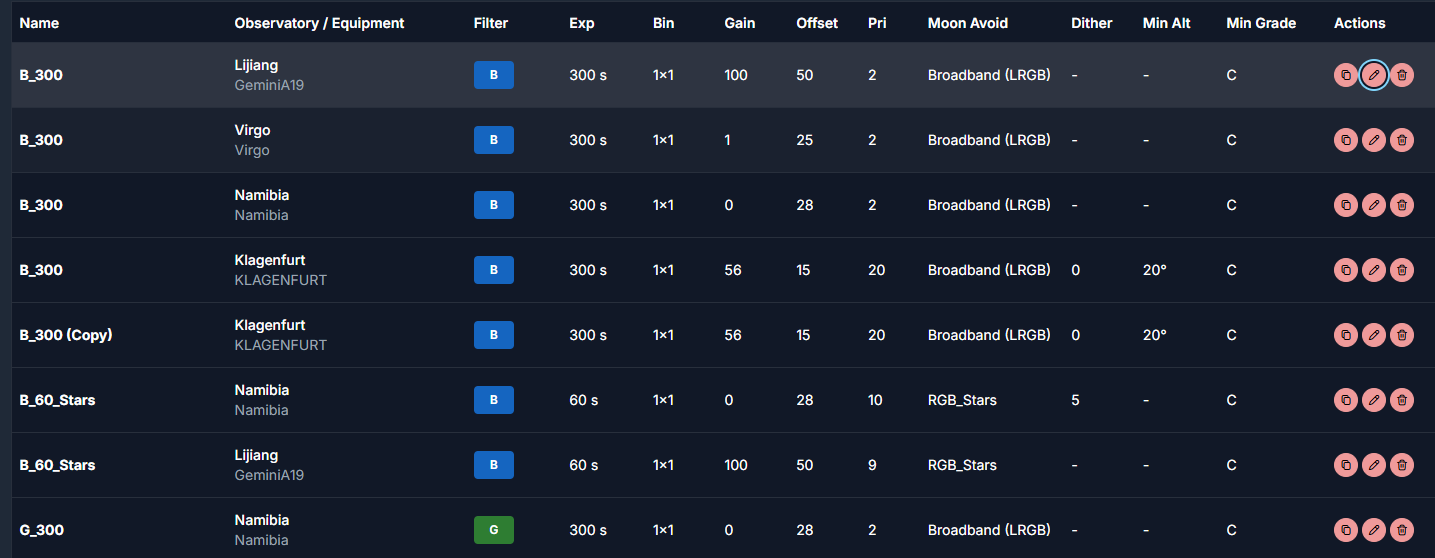
Exposure Settings
These fields define the actual capture settings for the template.
Filter
The filter that should be used for this exposure.
Exposure Time
The exposure duration per subframe.
Binning
The binning that should be used.
Readout Mode
The readout mode for the camera.
If this field is empty, AstroManager will use the default readout mode from N.I.N.A.
Gain
The camera gain for this exposure.
If the value is -1, AstroManager will use the default value from N.I.N.A.
Offset
The camera offset for this exposure.
If the value is -1, AstroManager will use the default value from N.I.N.A.
Sequence Settings
These fields influence how the imaging goal behaves later when it is being scheduled.
Priority
Defines how important this exposure entry is relative to the other entries in the same target.
Higher-priority entries can be preferred earlier when AstroManager decides what should be captured first, depending on the Scheduler Configuration and the Target Templates.
Dither Every X
Defines after how many frames N.I.N.A. should dither.
This helps reduce fixed-pattern noise in the final stack.
Min Altitude
Defines the minimum altitude at which imaging goals with this exposure template should be scheduled.
This can be stricter than the general observatory minimum altitude if you want higher-quality data e.g. for Filter L.
Acceptable Twilight
Defines how bright the sky is still allowed to be when this exposure entry runs.
This is useful when some filters or use cases can tolerate e.g. nautical twilight better than others.
Min Grade
Defines the minimum image grade that should still count as acceptable for exposures using this template.
This becomes important once image grading is part of your workflow.
Images are NEVER being discarded. This just controls if AstroManager displays the subframe as accepted or not and therefore if the exposure should count towards the imaging goal or not.
Moon Avoidance Profile
Defines which moon avoidance profile should be used for this exposure template entry.
See Moon Avoidance.
Using Templates Later
Once your templates exist, you can apply them while working with Imaging Goals.