Release Notes
Version History
Version 1.2.0
Released: 8. July 2026
AstroManager 1.2.0 is a major platform release. It expands AstroManager beyond Windows and Android, introduces the new Image Library, adds Cloud Service workflows, adds a powerful local image-import workflow, and upgrades planning, Remote Control, image grading, and runtime safety.
For workflow help, start with Image Library, Image Import & Review, Cloud Service, Integration Previews, Image Grading, and Runtime Safety.
Platform Support
- Added AstroManager support for
macOSandiOS. - Added
Linux desktopsupport. - The updated desktop and mobile apps use the refreshed AstroManager design system for more consistent navigation, controls, dialogs, and responsive layouts.
AstroManager App
- The Home Dashboard now shows recent captures and active sessions across all connected clients.
- Sky Atlas on large screens now supports freely adjustable sizing between the atlas and the right-side detail panel.
- Sky Atlas buttons now include help tooltips.
- Sky Atlas can now display constellation lines.
- Night Reports can now be deleted manually.
- Remote Control Classic now shows the Sequence Tree directly instead of hiding it behind a dialog.
Image Grading
- Image Grading now supports
Deviance,Threshold, and combined grading modes. - Added hard-reject rules for cases where a frame should be rejected immediately.
- Added new grading metrics for cooler-temperature deviance and RA/Dec deviance.
- Deviance calculations now use the median instead of the average, making grading less sensitive to outliers.
Runtime Safety
- Runtime Safety now supports advanced policy rules with time-based activation, stale telemetry detection, explicit unknown-data handling, debounce windows, recovery delays, cooldowns, and per-night execution limits.
- Supported safety metrics were expanded for weather, tracking, park state, sequence activity, heartbeat freshness, and capture freshness.
- N.I.N.A. runtime-safety evaluation now executes the enhanced policy model.
- Added runtime-safety policy templates and expanded the policy editor UI.
Cloud Service
- Added AstroManager Cloud Service storage with a 20 GB free tier for all users and optional paid storage tiers.
- Added cloud storage management and ZIP downloads for captures, masters, and selected exports.
- Added calibration master support for flats and darks used by integration previews.
- Added integration previews, including comparison tools and full-quality zoomed image previews directly inside AstroManager.
- Integration previews can now be used as Community Target images.
- Community Target integration previews now avoid external open-link behavior and use faster preview loading.
- Cloud uploads can be configured per client and per target, including an optional upload offset after astronomical twilight ends.
- Added calibration-file matching to connect captures with suitable calibration assets.
Image Library
- Added the Image Library as the central workspace for reviewing captured, imported, local, cloud-backed, and cloud-only image subs.
- Added
LightsandMasterslibrary modes for separating normal capture review from calibration-master review. - Added grouped and compact review views for project cleanup, dense frame comparison, and quality-focused review.
- Added filters for client, observatory, equipment, target, filter, review state, source availability, grade, HFR, star count, eccentricity, and median ADU.
- Added bulk actions for selecting filtered rows, re-syncing missing paths, moving files into a storage structure, preparing images for reimport, creating missing target captures, calibrating selected frames, recalculating metrics, regrading linked captures, and deleting selected local files.
- Added better handling for mixed local/cloud libraries, including cloud-backed captures and missing local paths.
Image Import
- Added a local Image Import & Review workflow for existing capture libraries.
- Added a live inspect view with keyboard-assisted review using
ShiftandCtrl. - Added field-shape analysis with a 3D viewer.
- Added local metric calculation for imported frames.
- Added plate solving through ASTAP.
- Added grading support for imported images.
Fixes
- Fixed recent captures on the Remote Control dashboard showing filter
Linstead of the correct mapped filter when client filter mappings were active. - Fixed pinned navigation menu behavior so dialogs are pushed out correctly.
- Fixed a rare Remote Control dashboard startup issue where Sky Atlas initialization could fail.
- Fixed several Sky Atlas refresh, auto-nearby, and search-term DSO search issues.
- Night Report auto-generation now runs about 30 minutes after astronomical twilight.
- Fixed the last autofocus status display in the Remote Control
Session Statustab. - Fixed a mismatch where target lists showed the capped
200 capturesvalue while the captures dialog showed the higher, correct capture count. - Improved DSO name display on Sky Atlas.
- Fixed guider connected status display in edge cases and optimized/fixed the guide graph.
Version 1.1.0 / 1.0.3.0
Released: 10. May 2026
This release expands AstroManager's community and collaboration workflows, improves equipment and filter handling, and adds stronger long-range observability features for planning.
Highlights
- AstroManager now includes dedicated public Community Targets workflows with search, public target pages, public user profiles, comments, upvotes, follows, and AstroBin-linked reference images.
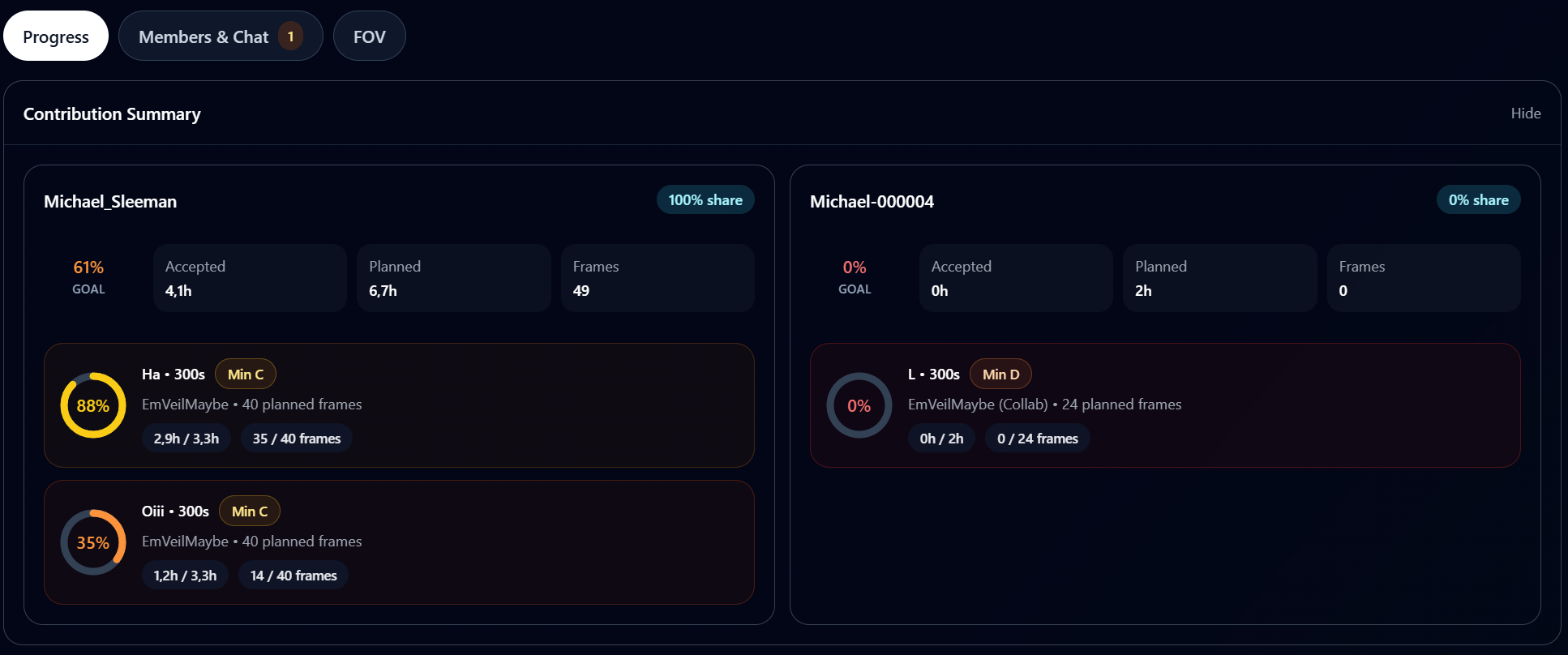
- The new Collaboration Hub adds shared target workflows with groups, invites, chats, trusted collaborators, and project-based access control.
Collaboration Projectscan now be created and monitored. See Collaboration Projects.
- The profile page now includes fields such as username and profile picture to support these new community features. See Public Profile.
- Deep-sky search now supports stronger full-year observability filters which allow for long-term planning. See Seasonal Filter.
- Sky Atlas
Magic Buttonmode now also supports community targets. See Magic Button. - Users can now set the
Bortle Scaledirectly in their observatory settings. See Sky Brightness And Bortle. - Equipment handling was expanded for OSC filters, custom filters, manual filter-wheel workflows, and easier camera data setup.
- AstroManager can now also be used in
N.I.N.A.DSO-Instruction Sets, including the newer container-based path and the older legacy workflow. See Use AstroManager in Sequences.
Fixes
- Fixed search terms such as
SH 2-106, which previously did not behave as expected. - Fixed missing DSO catalog entries such as
M45,M35,M44, andM50. This requires a fresh DSO database download in Settings. - Fixed completed targets with a raised base multiplier not being scheduled correctly.
- Fixed mismatched behavior when multiple targets share the same scheduler priority between
Night Previewand the scheduler itself. - Fixed automatic night-report generation for some time zones.
- Fixed repeated resize issues on desktop.
- Added support for the
FrameNrplaceholder in N.I.N.A. image-name workflows.
Version 1.0.2 / 1.0.0.2
Released: 10. April 2026
This release introduces a more powerful SkyAtlas, easier target reframing, clearer Remote Control status feedback, enhanced scheduling options, Android push notifications, and a wide range of workflow and UI optimizations.
Highlights
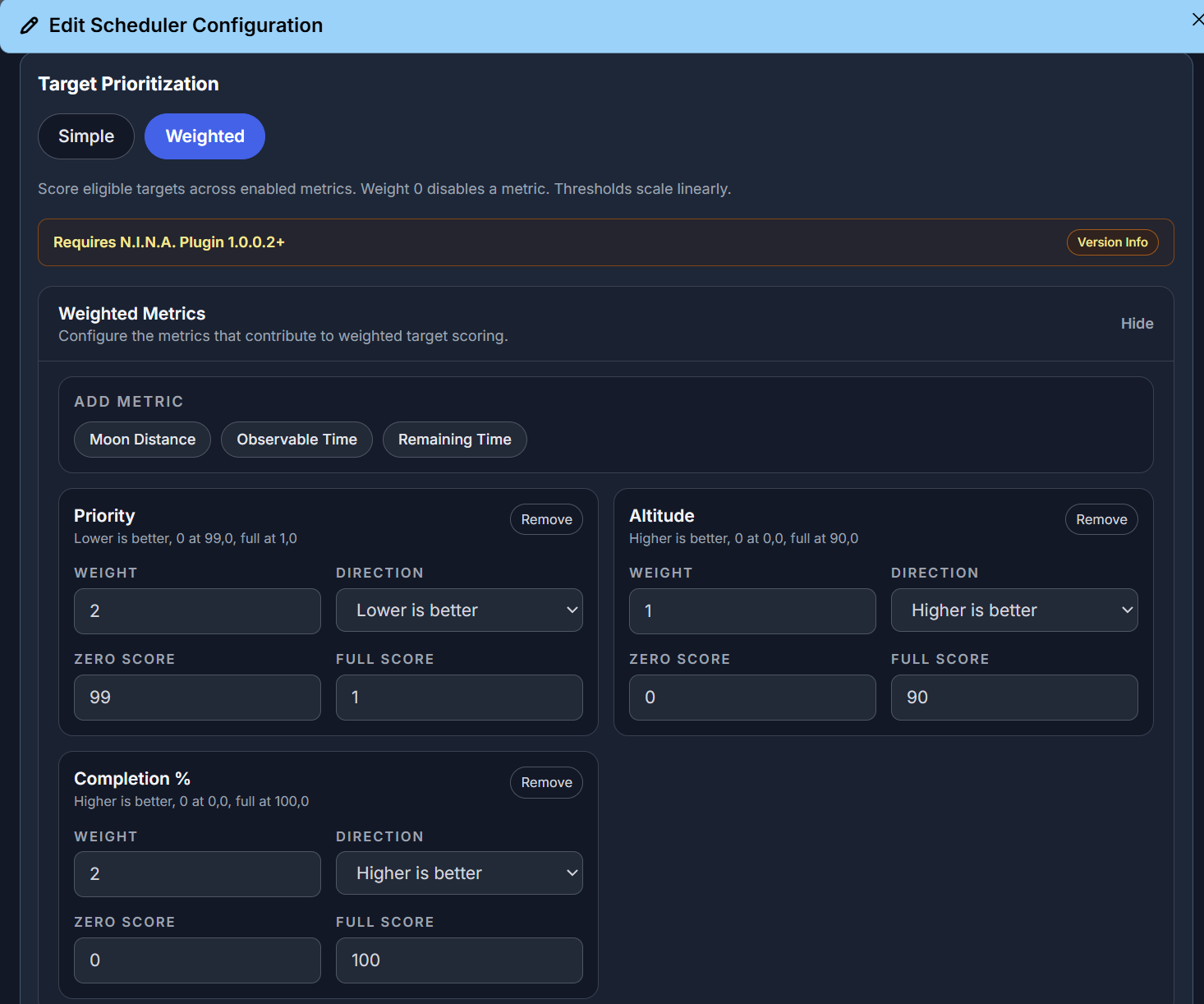
- Scheduler configuration now supports the new strategy "Higher Completion First" and a completely new
weighted modewith thresholds and preview support (requires N.I.N.A. Plugin Version 1.0.0.2 to work). See Weighted Mode.
- SkyAtlas features a new
Magic Buttonwith dedicated Bookmark, Target, Auto-Nearby and DSO Search modes. See Magic Button.
-
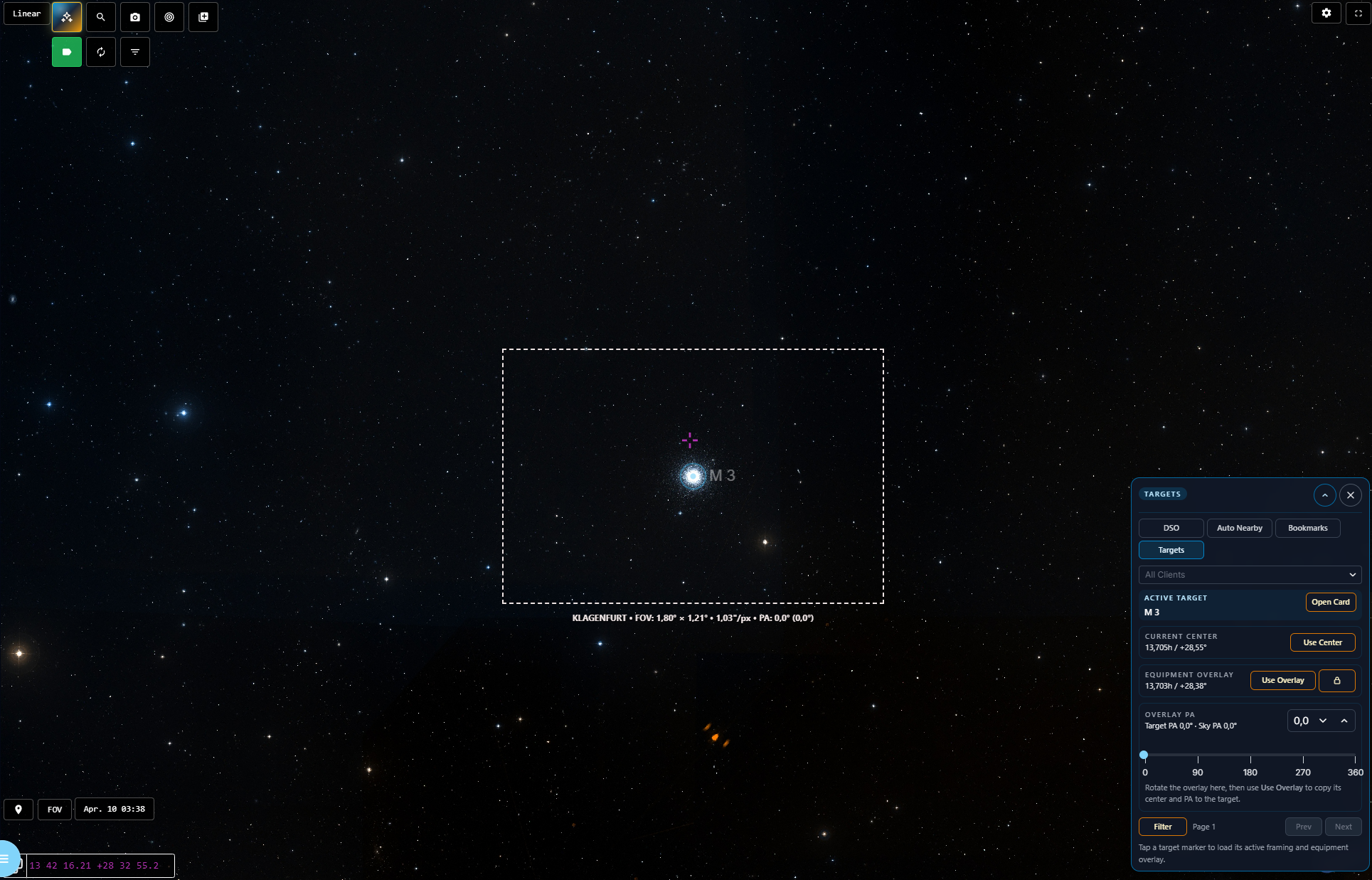
Target framing is now faster:
Targetmode in Sky Atlas can rotate the equipment overlay directly and apply overlay center plusPAback to the target, and the scheduler dialog formerly labeledExposures & Panelsis nowFraming & Goalswith a dedicated quick-rotatePAslider. See Magic Button and Change framing via SkyAtlas. -
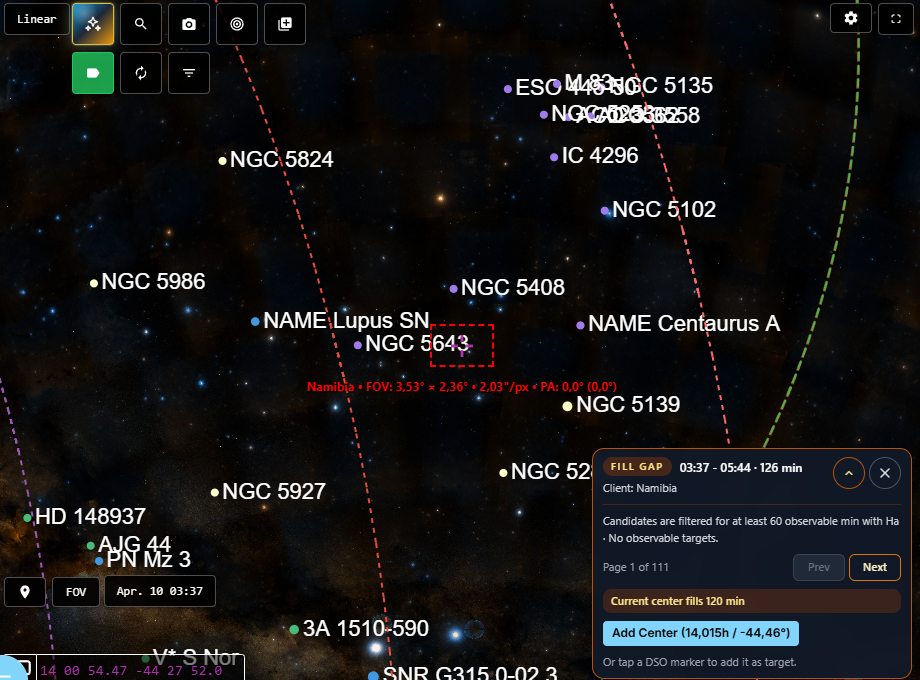
The
Fill Gapfeature viaTonight Planin the Remote Control dashboard was optimized. See Tonight Plan.
-
Android push notifications are now available and can be configured under Notifications => Preferences. See Notification Preferences.
-
The DSO details page now includes a modern, mobile-optimized layout and a new
Nearby Bookmarks / Targetssection. See Classic and Modern View Modes and Nearby Bookmarks / Targets. -
Imaging possibilities now support a dedicated single-filter mode, and multi-filter totals now use the maximum relevant value instead of summing filters together. See Filter Modes And Combined Totals.
-
Session Statusin the Remote Control dashboard now provides more detailed live sequence information. See Session Status Tab. - Sequence handling has been improved, including clearer restart behavior and a warning when AstroManager was already completed. See Sequence Tab.
- AstroManager now warns automatically when N.I.N.A. filter mappings are missing. See Plugin Configuration.
Improvements
- Sky Atlas now includes north-pole and south-pole markers for easier orientation if zoomed out a lot.
- The modern Remote Control dashboard layout has been refined for both larger desktop screens and mobile devices.
- Mobile only: The DSO altitude-chart tooltip now stays at the bottom of the screen so it no longer blocks the chart itself.
- Manual reordering of imaging goals was removed because it was not meaningfully used.
Fixes
- Fixed the guiding graph in the Remote Control dashboard.
- Fixed missing default assignments for moon-avoidance profiles, which could previously cause observability search, imaging possibilities, and related calculations to return missing or incorrect data for new users.
- Fixed fullscreen behavior of Sky Atlas on mobile devices when opened from the DSO details page.
- WebApp only: Fixed an issue where Altitude Chart and Search results could become inconsistent after changing the observatory between DSO Search and the DSO details page.
- Fixed missing extended details in the auto-generated night report.
- Fixed inline target-status editing.
- Fixed preview-scheduler handling so paused and archived targets are ignored.
- Fixed
Tonight Plantarget-card buttons that were not responding. - Fixed tapping Sky Atlas marker labels on mobile devices.
Initial Release
Released: April 2026
- Initial release of AstroManager.
- Initial release of the N.I.N.A. Plugin.
Upcoming Features
Processing Integration
Image Grading will be extended for better integration with processing tools such as PixInsight, for example by preparing or moving images above a certain grade into processing folders used by workflows like WBPP.
Offline Mode
Better support for setups where the N.I.N.A. client does not have internet access.
More Target Types
Planned support for planets, the Moon, comets, and the Sun.
Calibration Frame Management
Dark and flat management is planned for future versions.
Workflow Improvements
Further improvements around Sky Atlas, Remote Control, and Target Management.