Imaging Possibilities
Imaging Possibilities helps you understand when a target can be imaged, not just tonight, but across the upcoming weeks and months.
It is a planning aid that goes beyond simple visibility and helps answer: When is this target really worth imaging?
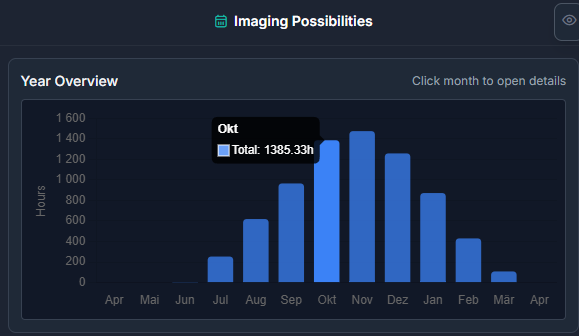
Year Overview
The year overview is the broad planning view.
It helps you see how a target behaves across the year, which months are strongest, and whether the target still fits your current season or should be postponed.
Month View
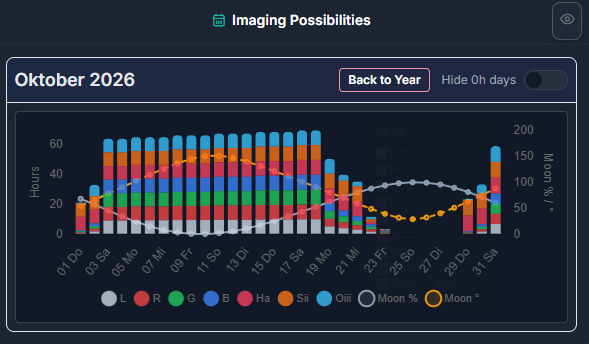
The month view is the more detailed short-term planning view.
It helps you judge whether the next nights or weeks are productive enough and whether a target is worth prioritizing right now.
Switching Between Views
You can switch between the year overview and the month view directly inside the Imaging Possibilities component.
Use the year overview for seasonal planning and the month view for actual scheduling decisions in the near future.
Why It Matters
This component helps you judge:
- whether upcoming nights are productive enough
- whether a target still fits the current season
- whether another target might be a better use of the same time
- how a target fits into the larger project timeline
Interaction
If multiple filters are shown, you can hide a specific filter by clicking its legend entry.
That makes it easier to focus on one filter at a time when the chart would otherwise feel too busy.
Filter Modes And Combined Totals
AstroManager also supports a dedicated single-filter mode when you want to evaluate one filter on its own more clearly.
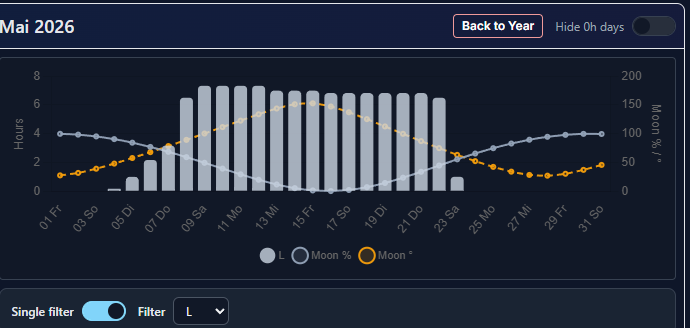
When multiple filters are shown together, the total result is based on the strongest relevant filter contribution instead of summing all filters together. That keeps the combined result more realistic for planning decisions.
Where You See It
This concept appears in multiple connected parts of AstroManager, especially:
- Deep Sky Object details
- Bookmarks
- Targets